> For the complete documentation index, see [llms.txt](https://docs.kognitos.com/llms.txt). Markdown versions of documentation pages are available by appending `.md` to page URLs; this page is available as [Markdown](https://docs.kognitos.com/guides/platform/automations.md).
# Automations
Manage published automations, monitor runs, configure triggers, and track performance.
## Overview
**Automations** are your published, production-ready workflows in Kognitos. When you build, test, and publish a draft, it becomes an automation. Think of the relationship like this:
* **Drafts** are your workspace for building, editing, and testing workflows
* **Automations** are the published versions actively running your operations
Each time you publish a draft, Kognitos creates a new major version of the automation (v1.0, v2.0, v3.0). Published versions are locked and repeatable. To make changes, click Edit as Draft, edit, and publish again.
## Dashboard
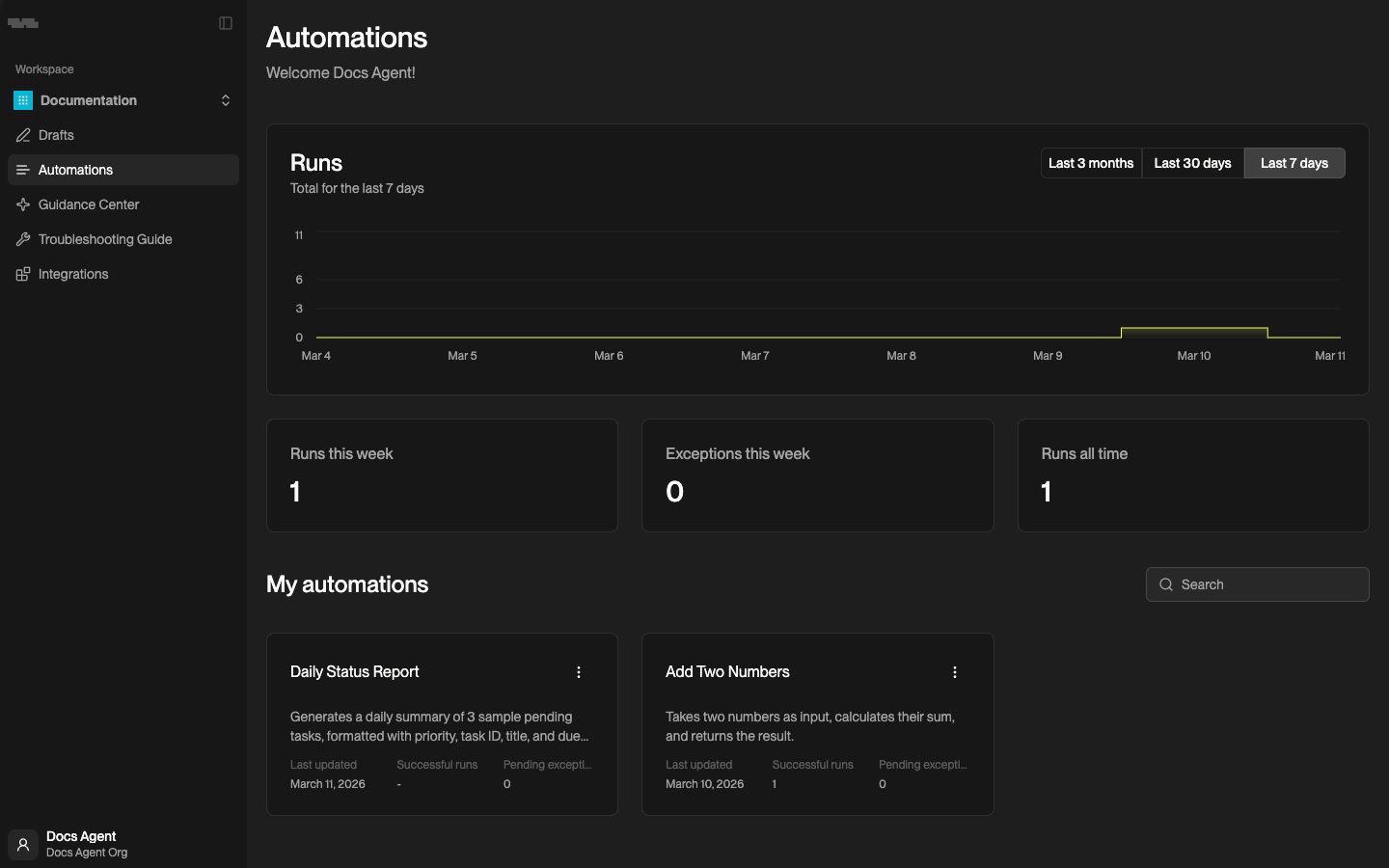
Access **Automations** from the left navigation menu. The dashboard shows workflow activity and health across your workspace.
### Runs Chart
The **Runs** chart displays total automation executions over time. Toggle between **Last 7 days** (default), **Last 30 days**, or **Last 3 months** to adjust the view.
### Metrics
Three cards summarize recent activity:
* **Runs this week** -- total runs executed in the past 7 days
* **Exceptions this week** -- total exceptions raised in the past 7 days
* **Runs all time** -- total runs executed in this workspace since creation
### My Automations
Below the metrics, you'll see cards for each automation in your workspace. Each card shows the automation name, description, last updated date, successful run count, and pending exception count.
Use the search bar to find automations by name. Click any card to open the automation detail view. Click ⋮ on a card for additional options.
## Automation Detail View
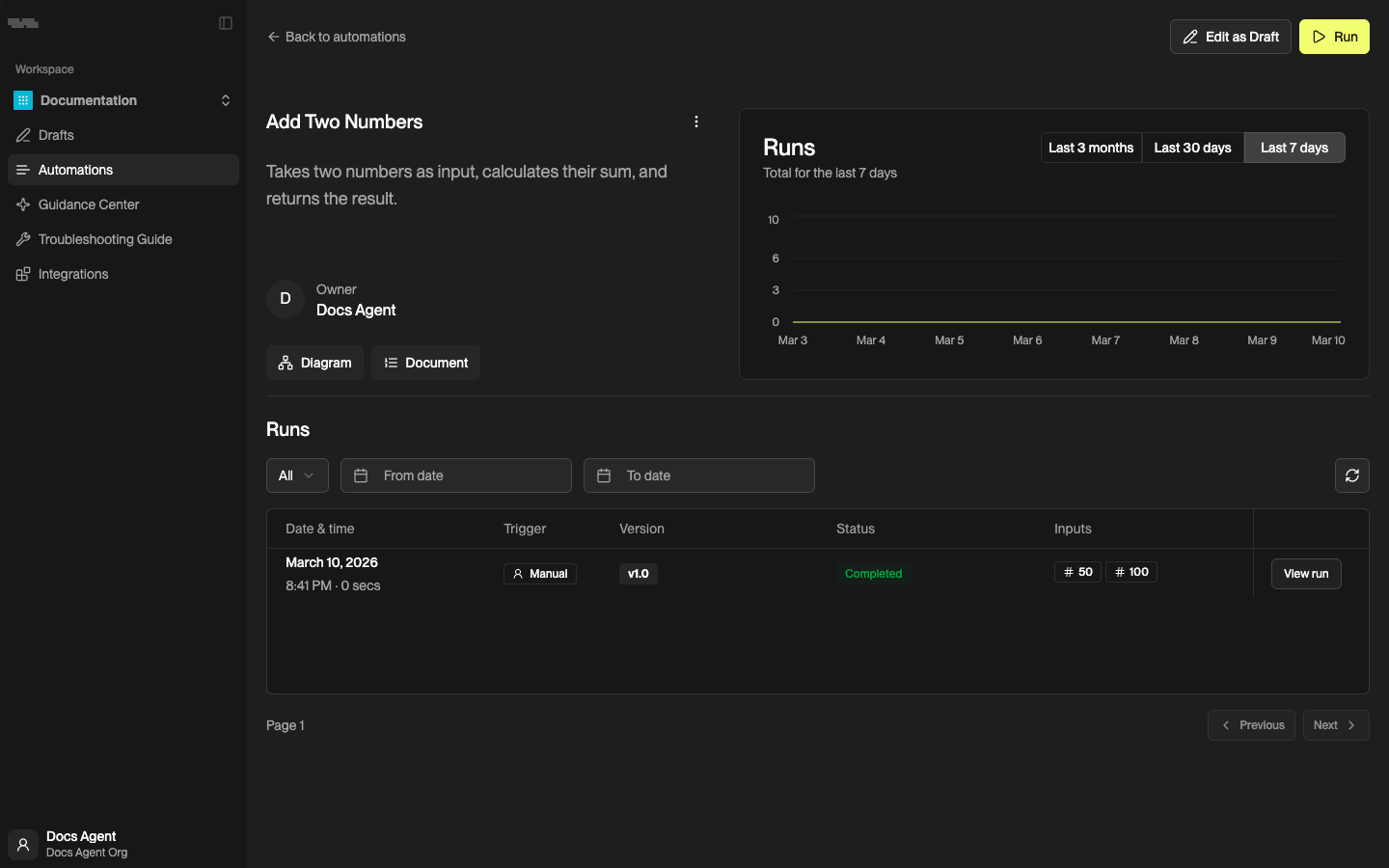
Click an automation card to see its full detail view. This page is where you monitor runs, configure triggers, and manage the automation.
### Actions
From the detail view, you can:
* Run -- start a new run manually
* Edit as Draft -- open the automation's draft to make changes (publish again to update)
* Diagram -- view a visual diagram of the automation's workflow
* Document -- view the automation's execution steps as a document
* ⋮ -- access additional options like rename, delete, copy, or open in Drafts
### Runs
The **Runs** section lists all executions for this automation. Filter by status, date range, or trigger type. Each row shows:
| Column | Description |
| --------------- | -------------------------------------------------------- |
| **Date & time** | When the run started and its duration |
| **Trigger** | How the run was initiated (Manual, Email, Webhook) |
| **Version** | Which published version was used (v1.0, v2.0, etc.) |
| **Status** | Current state: Completed, Processing, Waiting, or Failed |
| **Inputs** | The input values provided for this run |
Click View run to see the full details for a run, including outputs and any exceptions encountered.
#### Archiving Runs
You can **archive** completed runs to keep your run history focused on active work. To archive a run, click ⋮ on the run row and select Archive. Archived runs are removed from the default list but can still be viewed by applying the **Archived** filter.
{% hint style="info" %}
Archiving a run does not delete it. You can access archived runs at any time using the status filter on the Runs list.
{% endhint %}
#### Run Statuses
| Status | Meaning |
| -------------- | -------------------------------------------- |
| **Completed** | Run finished successfully |
| **Processing** | Run is actively executing |
| **Waiting** | Run is paused, waiting for input or guidance |
| **Failed** | Run encountered an unrecoverable error |
{% hint style="info" %}
Runs with a **Waiting** status need attention. Open the run to provide guidance, or visit the [Guidance Center](/guides/platform/guidance-center.md) to manage exceptions across all automations.
{% endhint %}
### Troubleshooting Guide
The **Troubleshooting Guide** shows saved guidance for this automation. When a known exception recurs, Kognitos checks the guide and applies the resolution automatically. See [Troubleshooting Guide](/guides/platform/automations/troubleshooting-guide.md) for full details.
## Running an Automation
You can start a run in several ways:
* **Manually** -- click Run from the detail view
* **On a schedule** -- configure a schedule to run automatically (automations without inputs only)
* **From an email** -- set up an email trigger so incoming messages start a run
* **Via webhook** -- configure a webhook trigger so external systems can start a run
* **Through the API** -- invoke the automation programmatically using the [REST API](/guides/api-reference/api-reference.md)
### Inputs and Triggers
Configure inputs and triggers from the [Document](/guides/platform/automations/automation-document.md) view by clicking Inputs & Triggers in the right panel. See [Document](/guides/platform/automations/automation-document.md) for details on setting up manual inputs, schedule triggers, and more.
## Versioning
Each time you publish a draft, Kognitos creates a new major version of the automation. Versions are numbered sequentially (v1.0, v2.0, v3.0).
* New runs always use the latest published version
* In-progress runs continue on the version they started with
* Previous versions are preserved in the version history
{% hint style="info" %}
To update a published automation, click Edit as Draft, make your changes, and publish again. This creates a new version without disrupting any runs in progress.
{% endhint %}
## Frequently Asked Questions
How do I see which version an automation is on?
The current version number is displayed in the automation detail view. The run history also shows which version each run used.
What happens to runs if I publish a new version?
Runs already in progress continue on the version they started with. Only new runs use the latest version.
Can I schedule an automation that has inputs?
No. Schedule triggers are only available for automations without required inputs. You can still use [webhook and email triggers](/guides/platform/drafts.md#triggers), which pass their data as inputs automatically.