# Start Parallel Runs

### Overview

In Kognitos, a process can call and run multiple subprocesses in parallel using the **`start a run`** syntax. Starting parallel runs enables the parent process to explicitly wait for the runs, retrieve the statuses, and fetch the outputs.

{% hint style="success" %}
This is ideal when multiple subprocesses need to run simultaneously and you need to retrieve the statuses or outputs of multiple runs.
{% endhint %}

```
                       Parent Process
                             │
     ┌-----------------------┴------------------------┐
     │                       │                        │
     │                       │                        │
Parallel Subprocess    Parallel Subprocess    Parallel Subprocess

```

### How To Start Parallel Runs

This section describes how to start parallel runs using the `start a run` syntax.

#### Syntax

```
process each item as follows:
    start a run where
        the procedure is {subprocess}
        {input}
```

#### Parameters

1. `item`: Object to loop over.
2. `subprocess`: The name of the subprocess.
3. `input`: Objects to pass to the subprocess, if necessary.

{% hint style="success" %}
**Use the Process Widget**

When defining the procedure name, use the **Process Run Widget**:

1. Type a forward slash <kbd>/</kbd> after "the procedure is ".
2. Select **Process** from the menu.
3. Select the process you want to call from the Process drop-down menu.
4. Click <kbd>Save</kbd>.
   {% endhint %}

#### Example

```
the items are "apples", "flour", "eggs", "milk"
process each item as follows
    start a run where
        the procedure is /to make apple pie
        the ingredient is the item
```

Click here to walk through an end-to-end example.

{% hint style="warning" %}
**Remember to Publish Your Process**

You need to promote your automation from the **Playground** to a **Process** in order to start parallel runs. This applies to both the main parent process and the subprocess. Otherwise, you will get an `Assertion Error` saying `procedure not found`.
{% endhint %}

### Handling Subprocess Runs

A parent process can **explicitly wait** for the runs of a subprocess to complete. Once all runs have finished executing, the system notifies the parent process which runs will proceed further. This allows the parent to respond accordingly, such as collecting data and output from each subprocess, or taking further action based on the results.

#### Adding an Explicit Wait

To add an explicit wait, include the following line into your automation *after* starting parallel runs:

```
wait for the runs
```

#### Getting Output From Parallel Runs

To get results from subprocesses that are called with the `start a run` syntax, use the following syntax after adding an explicit wait:

#### Syntax

Below is a line-by-line overview of the automation syntax. Expand each line to learn more.

<details>

<summary><code>retrieve data from the run(s)</code></summary>

**What does it do?** Instructs the system to retrieve data from the parallel run(s).

**Where does it go?** This phrase should be written on a new line.

**Does it require input data?** ⛔ No — This phrase does *not* require input data.

</details>

<details>

<summary><code>the fact names are</code></summary>

**What does it do?** Specifies the name of the data elements to retrieve from the parallel runs.

**Where does it go?** This phrase should be indented below `retrieve data from the run` or `retrieve data from the runs`.

**Does it require input data?** ✅ Yes — Specify one or more **text** values containing the names of the data elements.

**Example:** `The fact names are "status", "name", "age"`

</details>

#### Examples

**1. Singular Run**

```
retrieve data from the run where
  the fact names are "output sum"
get the output sum from the data
```

**2. Multiple Runs**

```
retrieve data from the runs where
  the fact names are "status"
get the statuses from the data
```

{% hint style="info" %}
**Automatic Pluralization:** If there are multiple runs, the system will automatically pluralize the output in the parent process (e.g., `status` -> `statuses`).
{% endhint %}

### Walkthrough: Run Parallelization

This is an example walkthrough of invoking multiple instances of a subprocess in parallel runs.

#### Parent Process

```
the department's max retry wait count is 2
the names are "Eva", "Ivan", "Leo", "Nia", "Zoe"
process each name as follows
  start a run where
    the procedure is /to greet the user
    the user is the name 
wait for the runs
retrieve data from the runs
  the fact names are "greeting"
get the greetings from the data
```

<table><thead><tr><th width="127.41015625">Line #</th><th>Description</th></tr></thead><tbody><tr><td>Line 1</td><td>The wait count is set to 10 seconds (2 intervals of 5 seconds).</td></tr><tr><td>Line 2</td><td>A data element is defined as a list of names.</td></tr><tr><td>Line 3</td><td>Initiates a loop across the list of names.</td></tr><tr><td>Line 4</td><td>Initiates subprocess invocation using <code>start a run where</code> syntax.</td></tr><tr><td>Line 5</td><td>Specifies the name of the published subprocess to call.</td></tr><tr><td>Line 6</td><td>Passes input to the subprocess: <code>the name</code> is passed as <code>the user</code>.</td></tr><tr><td>Line 7</td><td>Sets an explicit wait for the subprocess runs.</td></tr><tr><td>Line 8</td><td>Explicitly retrieves <code>the greeting</code> output from the subprocess runs.</td></tr></tbody></table>

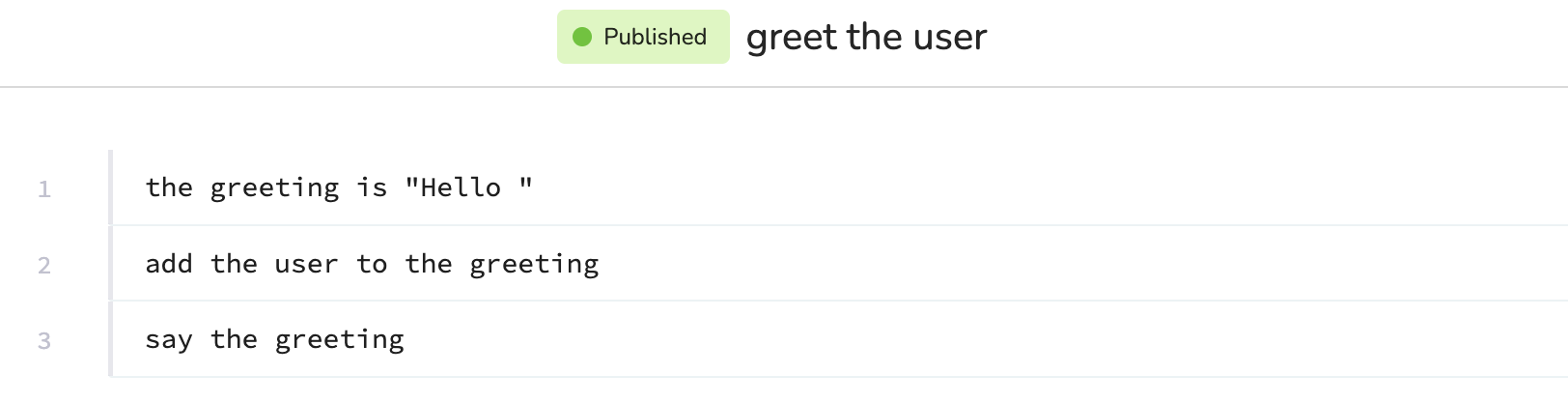
#### Subprocess

<figure><img src="https://681267560-files.gitbook.io/~/files/v0/b/gitbook-x-prod.appspot.com/o/spaces%2FyXsMyN9vMn8AoQ4BYIwT%2Fuploads%2Fgit-blob-d86838f0a23936a97ba544ca7eed30e0310bba94%2Fgreet_the_user_subprocess.png?alt=media" alt=""><figcaption></figcaption></figure>

<table><thead><tr><th width="106.296875">Line #</th><th>Description</th></tr></thead><tbody><tr><td><strong>Line 1</strong></td><td>Data is defined as a string that says <code>"Hello "</code></td></tr><tr><td><strong>Line 2</strong></td><td>The <code>user</code> is added to the end of the greeting.</td></tr><tr><td><strong>Line 3</strong></td><td>The automation outputs a greeting with the user's name at the end.</td></tr></tbody></table>

#### Subprocess Output

In **line 9**, `the greetings` is referenced as output from the subprocess runs. The **results** are:

* Hello Eva
* Hello Ian
* Hello Leo
* Hello Nia
* Hello Zoe
