> For the complete documentation index, see [llms.txt](https://docs.kognitos.com/llms.txt). Markdown versions of documentation pages are available by appending `.md` to page URLs; this page is available as [Markdown](https://docs.kognitos.com/legacy/legacy-experience/writing-automations/calling-other-processes/run-a-subprocess.md).
# Run a Subprocess
Learn how to call and run a subprocess using the process run widget.
### Overview
One of the three ways a parent process can call a subprocess in Kognitos is by using the **Process Run Widget**. In this setup, the parent process controls the execution and output of the subprocess.
{% hint style="success" %}
This method is ideal for single-run scenarios where you need to capture the result and status of a subprocess.
{% endhint %}
### How to Call a Subprocess Using the Process Run Widget
1. In your automation, write the keyword run followed by a slash /
2. From the menu that appears, select **Process**.
3. Click on the Process drop-down menu to select the process you want to call.
4. Click **Save.**
### Passing Data to a Subprocess
Passing data to a subprocess allows the parent process to provide the specific inputs the subprocess needs to do its work. This makes subprocesses more dynamic and reusable, as they don’t depend on hardcoded values. To enable this, the parent process must explicitly pass the required data, and the subprocess must be designed to accept and return values accordingly.
#### Parent Process
In your **parent process**, add a new line after `run `. Indent and reference the data needed for the subprocess run on the new line. If a data element is required but not explicitly provided, Kognitos will raise a [**question**](/legacy/legacy-experience/readme/core-concepts.md#question)**.**
#### Subprocess
In your **subprocess**, include one of these lines at the end of your automation to return data to the parent process. This syntax informs Kognitos of the subprocess's result so it can be accessed in the parent process.
* **For a single result:** `the result is {result}`
* **For multiple results:** `the results are {result 1}, {result 2}, ...`
### Examples
#### 1. Returning a Single Result
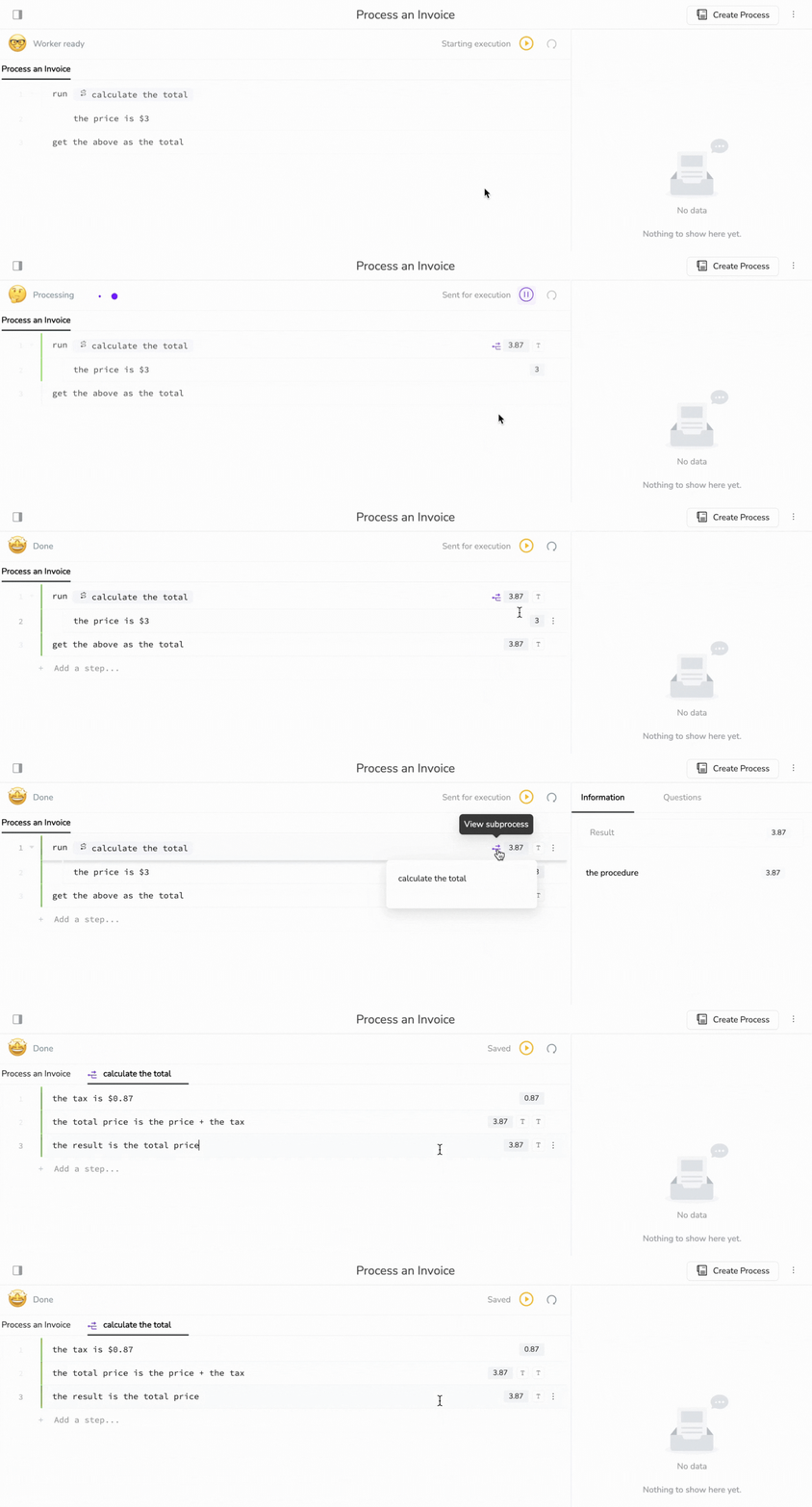
This example shows how a subprocess can be used to calculate a total. The main process, **Process an Invoice**, calls the subprocess **calculate the total** and provides the price. The subprocess uses the price to calculate and return the total.
{% tabs %}
{% tab title="Parent Process (Process an Invoice)" %}
```
run /calculate the total
the price is $3
get the above as the total
```
{% endtab %}
{% tab title="Subprocess (calculate the total)" %}
```
the tax is $0.87
the total price is the price + the tax
the result is the total price
```
{% endtab %}
{% endtabs %}
#### 2. Returning Multiple Results
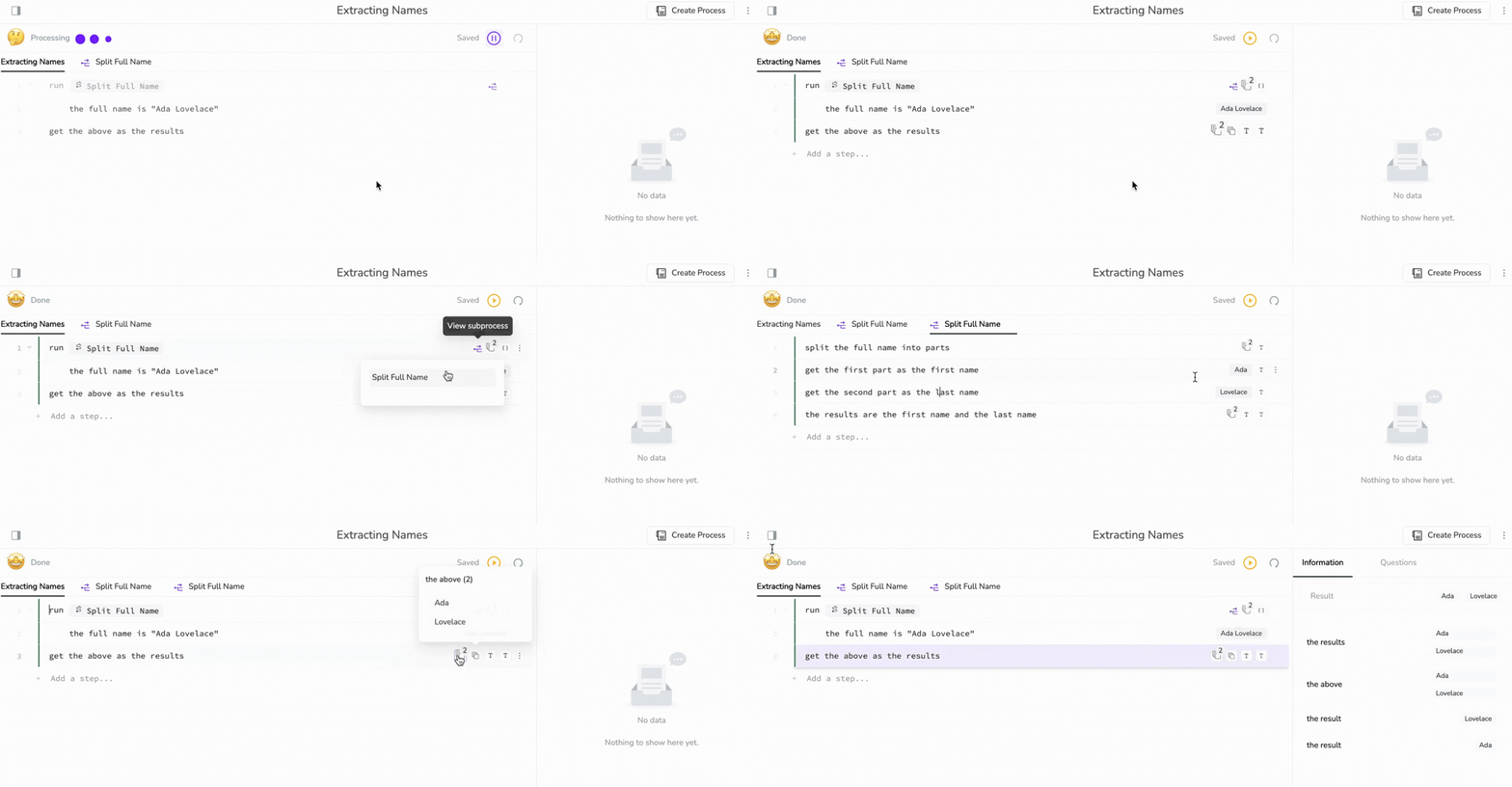
This example shows how to return multiple results from a subprocess. Here, the subprocess **Split Full Name** returns two results: `the first name` and `the last name` .
{% tabs %}
{% tab title="Parent Process (Extracting Names)" %}
```
run /Split Full Name
the full name is "Ada Lovelace"
get the above as the results
```
{% endtab %}
{% tab title="Subprocess (Split Full Name)" %}
```
split the full name into parts
get the first part as the first name
get the second part as the last name
the results are the first name, the last name
```
{% endtab %}
{% endtabs %}
{% hint style="success" %}
If you need to run **multiple instances** of a subprocess in parallel, see [Starting Parallel Runs](/legacy/legacy-experience/writing-automations/calling-other-processes/start-parallel-runs.md) for details on using the `start a run` syntax.
{% endhint %}
---
# Agent Instructions
This documentation is published with GitBook. GitBook is the documentation platform designed so that both humans and AI agents can read, navigate, and reason over technical content effectively. Learn more at gitbook.com.
## Querying This Documentation
If you need additional information that is not directly available in this page, you can query the documentation dynamically by asking a question.
Perform an HTTP GET request on the current page URL with the `ask` query parameter, and the optional `goal` query parameter:
```
GET https://docs.kognitos.com/legacy/legacy-experience/writing-automations/calling-other-processes/run-a-subprocess.md?ask=&goal=
```
`ask` is the immediate question: it should be specific, self-contained, and written in natural language.
`goal` is optional and describes the broader end goal you are ultimately trying to accomplish on behalf of the user. GitBook uses it to tailor the answer towards what is most useful for that goal.
The response will contain a direct answer to the question and relevant excerpts and sources from the documentation.
Use this mechanism when the answer is not explicitly present in the current page, you need clarification or additional context, or you want to retrieve related documentation sections.
.gif?alt=media)