> For the complete documentation index, see [llms.txt](https://docs.kognitos.com/llms.txt). Markdown versions of documentation pages are available by appending `.md` to page URLs; this page is available as [Markdown](https://docs.kognitos.com/legacy/legacy-experience/processes/starring-data.md).
# Starring Data
Highlight key data elements in a process run to easily track and reference across executions.
## Overview
When reviewing automation runs in Kognitos, you may want to scan for specific data points important to a process, such as an invoice number, payment status, or user ID. **Starring Data** allows you to pin key data elements so they stand out across process runs and are easier to track.
### When to Star Data
Use this feature to:
* Track important identifiers or values across executions
* Troubleshoot a process by monitoring specific data points
* Quickly scan and compare outputs across multiple runs
## How to Star Data
To star data of interest in a process:
{% stepper %}
{% step %}
**Open a Process**
Navigate to **Processes** in the left sidebar and select a process.
{% endstep %}
{% step %}
**Access a Process Run**
To view a previous run, click on View Runs in the upper-left and choose a run from the list.\
To start a new run, click on Run in the upper-right.
{% endstep %}
{% step %}
**Select Data**
Click on the name of a data element in your process.
{% endstep %}
{% step %}
**Star Data**
In the **Information** panel on the right, click the star icon (⭐️) next to the data element. The star will turn yellow to indicate the value is starred.
{% endstep %}
{% endstepper %}
{% @supademo/embed url="" demoId="cmcwlye6u1k0w9empfh046yke" %}
{% hint style="info" %}
Note: There are no limits to the number of data values that can be starred.
{% endhint %}
## Viewing Data Stars
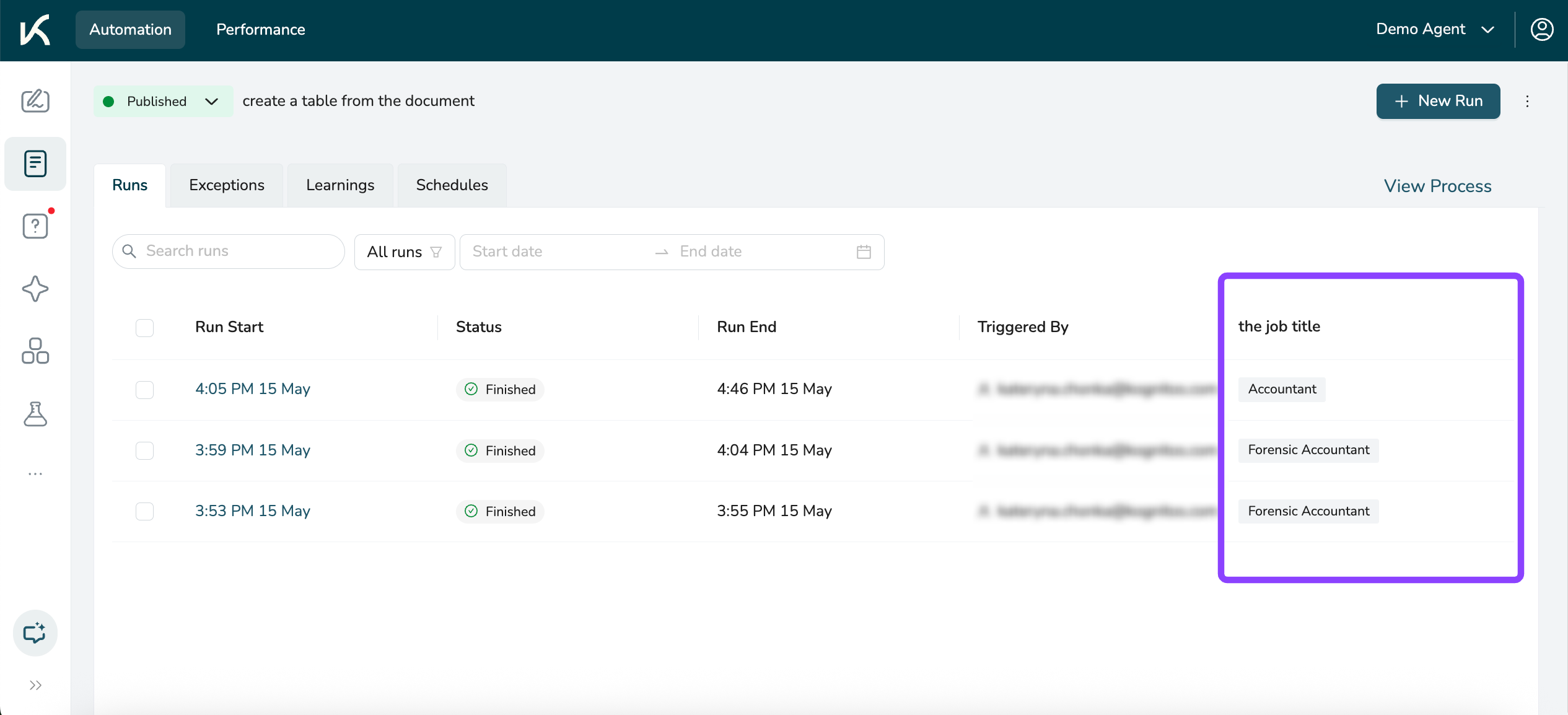
After you’ve starred one or more data elements, you can view them in the list view of a process’s runs. This is visible to anyone with access to the agent.
{% stepper %}
{% step %}
**Open a Process**
Navigate to **Processes** in the left sidebar and select a process.
{% endstep %}
{% step %}
**View Runs**
Click on View Runs in the upper-left to see a list of your process's runs.
You'll see a column for each starred data value in this list view.
{% endstep %}
{% endstepper %}
## Updating Stars
You can modify starred data at any time by removing existing stars or starring new values. Changes to starred data are visible to all users with agent access.
#### Removing Stars
Hover over a starred data value in the **Information** panel and click the yellow star (⭐️) icon next to it to unstar it. The value will no longer appear in the process runs list view.