# Exception Routing

## Overview

**Exception routing** is a process configuration setting. It allows agent admins to configure assignment and notification rules for exceptions. When a process encounters an [**exception**](https://docs.kognitos.com/legacy/legacy-experience/exception-handling) *(a question requiring guidance),* these rules ensure that the right person is automatically assigned to handle it and that the appropriate team members are notified.

## Configuration

**Agent admins** can configure exception routing for a given process, including the following settings:

<table data-header-hidden><thead><tr><th width="215.48046875"></th><th></th></tr></thead><tbody><tr><td><strong>Exception Assignment</strong></td><td>Specifies who is automatically assigned to handle exceptions.</td></tr><tr><td><strong>Email Notifications</strong></td><td>Specifies who receives email alerts when exceptions need guidance.</td></tr></tbody></table>

### How to Configure Exception Routing

Follow these steps to configure exception routing for a process:

{% stepper %}
{% step %}
**Select a Process**

Navigate to <kbd>**Processes**</kbd> and click on the process to be configured.
{% endstep %}

{% step %}
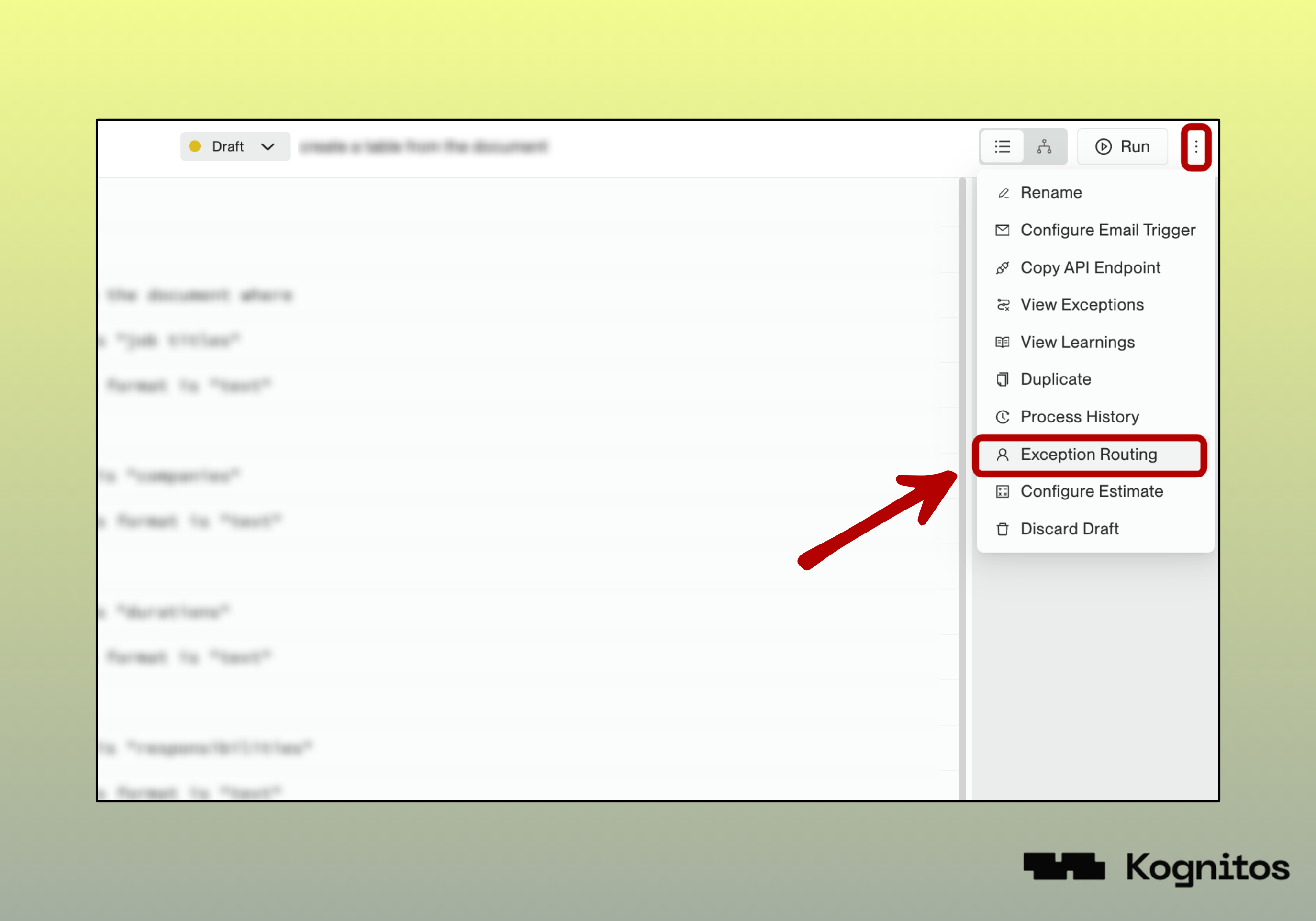
**Exception Routing**

Click on the three-dot menu <kbd>**⋮**</kbd> in the top-right and select <kbd>**Exception Routing**</kbd>.

{% hint style="warning" %}
The process must be in **draft** mode. If the process is published, click <kbd>**Edit**</kbd> first.
{% endhint %}

<figure><img src="https://681267560-files.gitbook.io/~/files/v0/b/gitbook-x-prod.appspot.com/o/spaces%2FyXsMyN9vMn8AoQ4BYIwT%2Fuploads%2Fgit-blob-16548855fe088cf16a730ca54badb26f6b9a4fe0%2Fexception-routing-setting.png?alt=media" alt=""><figcaption><p>Exception Routing Menu Option</p></figcaption></figure>
{% endstep %}

{% step %}
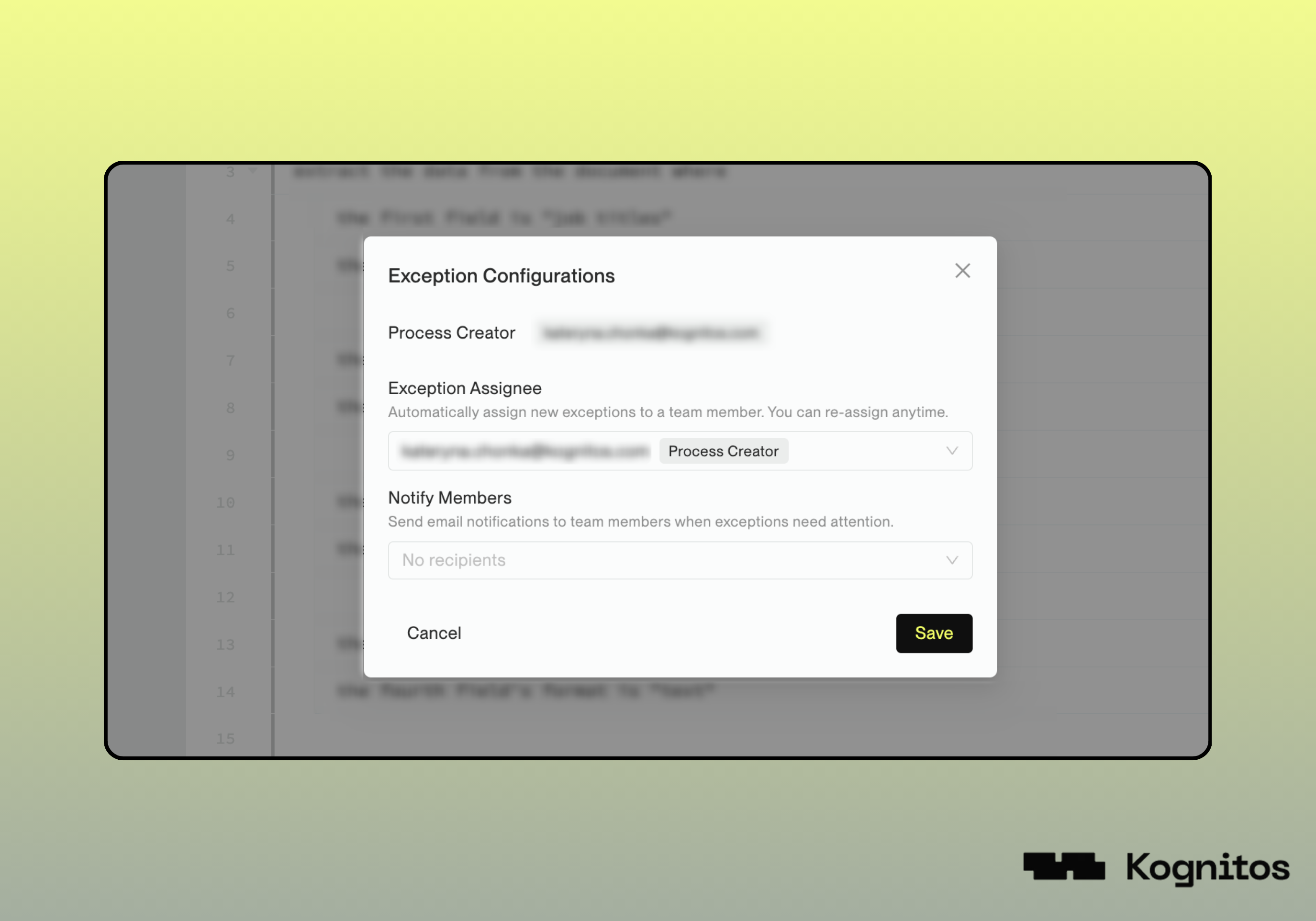
**Exception Configurations**

Configure the following details, which may be updated at any time:

<table><thead><tr><th width="192.65625">Field</th><th>Description</th></tr></thead><tbody><tr><td><strong>Exception Assignee</strong> <em>(Required)</em></td><td>The user(s) to assign to handle exceptions for this process. At least one user is required.</td></tr><tr><td><strong>Notify Members</strong> <em>(Optional)</em></td><td>The user(s) to notify via email when exceptions need guidance. This is optional and may be left blank.</td></tr></tbody></table>

{% hint style="info" %}
Only **collaborators** of the agent can be selected as assignees.

To add additional users, go to **Settings** → **Invite Users** → **Add Collaborator**.
{% endhint %}

<figure><img src="https://681267560-files.gitbook.io/~/files/v0/b/gitbook-x-prod.appspot.com/o/spaces%2FyXsMyN9vMn8AoQ4BYIwT%2Fuploads%2Fgit-blob-6fa37796f31fdf257aa22eab889410d5b2d5f19b%2Fexception-configurations.png?alt=media" alt=""><figcaption><p>Exception Configurations</p></figcaption></figure>
{% endstep %}

{% step %}
**Save and Publish**

Press <kbd>**Save**</kbd> to apply your configuration changes. Then, **publish** your process to make the changes live.
{% endstep %}
{% endstepper %}

## Examples

### 1. Basic Assignment

In this example, exceptions go to the process creator with no notification recipients.

<table data-header-hidden><thead><tr><th width="220.45703125"></th><th></th></tr></thead><tbody><tr><td><strong>Exception Assignee</strong></td><td>john.doe@company.com <em>(Process Creator)</em></td></tr><tr><td><strong>Notification Recipients</strong></td><td>None</td></tr></tbody></table>

### 2. Specialized Handler with Team Notifications

Here, exceptions are assigned to the process creator while the team lead and backup get email notifications.

<table data-header-hidden><thead><tr><th width="220.45703125"></th><th></th></tr></thead><tbody><tr><td><strong>Exception Assignee</strong></td><td>jane.smith@company.com <em>(Process Creator)</em></td></tr><tr><td><strong>Notification Recipients</strong></td><td>team-lead@company.com, backup-person@company.com</td></tr></tbody></table>

### 3. On-Call Assignment

Here, the current on-call person is assigned exceptions while the manager stays informed through email notifications.

<table data-header-hidden><thead><tr><th width="220.45703125"></th><th></th></tr></thead><tbody><tr><td><strong>Exception Assignee</strong></td><td>oncall@company.com <em>(current on-call person)</em></td></tr><tr><td><strong>Notification Recipients</strong></td><td>manager@company.com</td></tr></tbody></table>